How LLM Inference Really Works: A Deep Dive into Optimisation Techniques
How LLM Inference Really Works: A Deep Dive into Optimisation Techniques
Making your language models blazing fast without breaking the bank
You’ve trained a brilliant 70-billion parameter LLM. It’s accurate, it’s powerful, and it understands context beautifully. But here’s the problem—it takes 10+ seconds to spit out a response, and your GPU bills are climbing faster than you can say “transformer architecture.”
I know this pain quite well. Training might cost you mil lions upfront, but inference? That’s where the costs really compound over time. Every single user query, every API call, every token generated—it all adds up.
But here’s the good news: there are some truly brilliant optimisation techniques that can make your LLM inference 10-20x faster whilst using a fraction of the memory. And no, I’m not talking about buying more expensive hardware. I’m talking about smart engineering.
Let’s understand how LLM inference actually works under the hood, and more importantly, how we can optimise it properly.
Understanding LLM Inference: The Fundamentals
Before we dive into optimisation tricks, let’s get the basics straight. What actually happens when your LLM generates text? And more importantly, where do things slow down?
The Two Phases of Inference
LLM inference isn’t a single monolithic process—it has two very distinct phases with completely different performance characteristics.
Phase 1: Prefill (Prompt Processing)
When you send a prompt like “Summarise this 2000-word document,” the model first needs to process all 2000 input tokens. This is called the prefill phase, and here’s what makes it special:
- Highly parallel: All input tokens can be processed simultaneously
- Compute-bound: Your GPU’s computational units are the bottleneck, not memory
- One-time cost: Happens once per request, regardless of output length
- Matrix multiplication heavy: Large batch matrix operations (Q, K, V for all tokens at once)
During prefill, modern GPUs shine. An A100 can process thousands of tokens in milliseconds because it can leverage massive parallelism. The KV cache for these input tokens is computed once and stored.
Phase 2: Decode (Token Generation)
Now comes the tricky part—generating the response token by token. This is the decode phase, and it’s fundamentally different:
- Inherently sequential: Each token depends on all previous tokens
- Memory-bound: Waiting for memory access, not computation
- Repeats N times: For N output tokens, you do this N times
- Small compute per step: Processing just one token, but attending to all previous ones
Here’s where the pain starts. If you’re generating a 500-token response, you’re running this decode step 500 times sequentially. No amount of parallelism helps because token 501 literally cannot be computed until you know token 500.
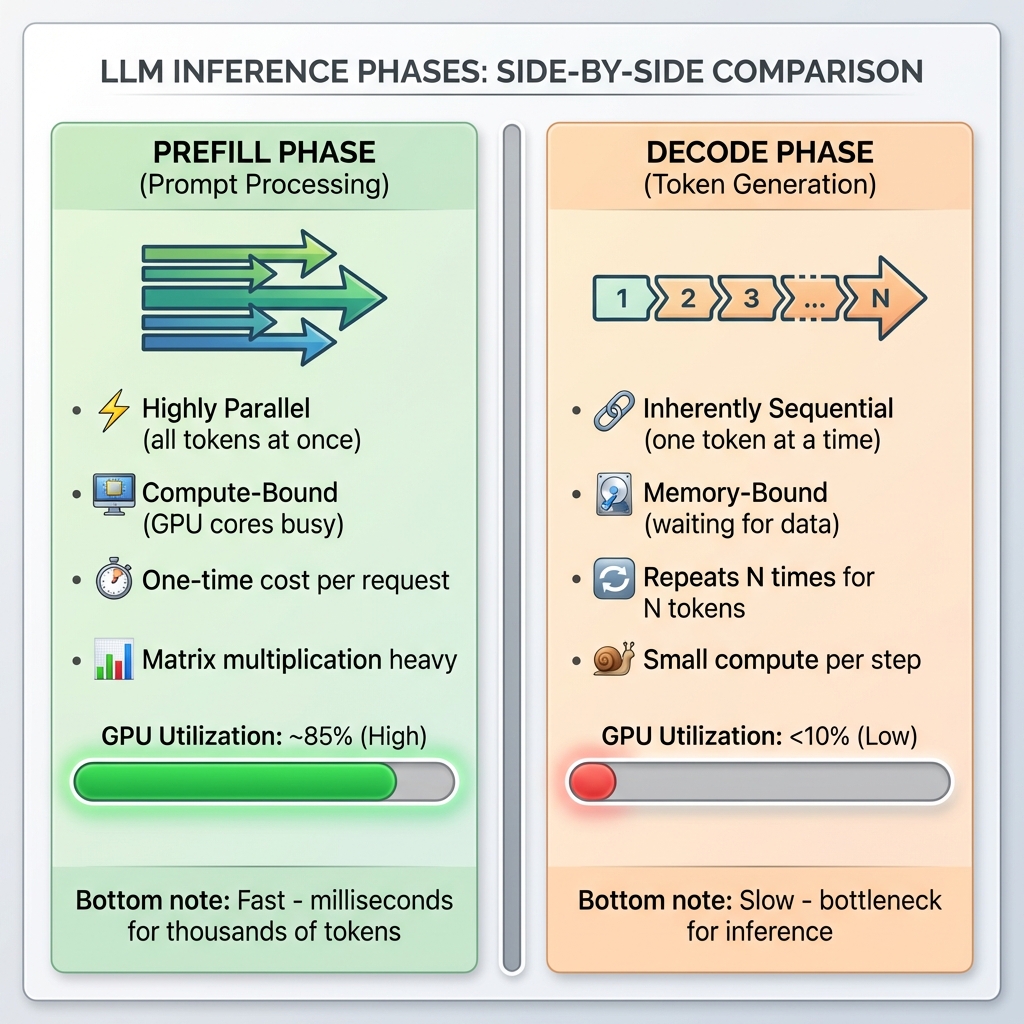
Figure 1: Side-by-side comparison of LLM inference phases. Prefill is fast and parallel with high GPU utilization (~85%), while decode is slow and sequential with very low GPU utilization (<10%).
The Autoregressive Dance
LLMs generate text one token at a time in what’s called autoregressive generation. Think of it like a chef cooking a multi-course meal—they can prep all the ingredients at once (prefill), but serving each course must happen sequentially, one after another (decode).
Here’s where things get interesting (and a bit frustrating). Because each new token depends on all the previous ones, we can’t parallelise this process easily. When generating token #50, the model needs to look at tokens #1 through #49. It’s inherently sequential.
But why exactly does each token need to “look at” all previous tokens? That brings us to…
The Attention Mechanism During Inference
At the heart of transformers is the self-attention mechanism. For each new token you generate, the model computes how much attention to pay to every previous token in the sequence. Let me break down what actually happens:
Step 1: Computing Q, K, V
For the new token you’re generating, the model computes three vectors:
- Query (Q): What is this token looking for?
- Key (K): What does this token represent?
- Value (V): What information does this token contain?
For all the previous tokens in your KV cache, you already have their K and V vectors stored.
Step 2: Attention Score Computation
The model computes attention scores by taking the dot product of the new token’s Query with all previous tokens’ Keys:
attention_scores = Q @ [K₁, K₂, K₃, ..., Kₙ]ᵀ
For a sequence of length N, that’s N dot products. Got a 4000-token conversation? That’s 4000 attention score computations for each new token.
Step 3: Softmax and Weighted Sum
These scores are normalized with softmax, then used to weight the Value vectors:
attention_weights = softmax(attention_scores / √d)
output = attention_weights @ [V₁, V₂, V₃, ..., Vₙ]
The Complexity Problem:
The complexity is O(N²) where N is your sequence length. Here’s why that matters:
- 1K tokens: 1 million attention computations
- 4K tokens: 16 million attention computations
- 128K tokens (GPT-4): 16 billion attention computations
And remember, this happens for every layer in your model. A 70B model might have 80 layers. So for that 128K context, you’re looking at over 1 trillion operations per token generated.
No wonder it’s slow!
The Real Bottleneck: Memory Bandwidth
But wait, there’s more. The real bottleneck isn’t even the computation itself—it’s memory bandwidth. Let me explain why with some numbers.
GPU Compute vs Memory Bandwidth (A100 GPU):
- Peak Compute: 312 TFLOPS (trillion floating-point operations per second)
- Memory Bandwidth: 1.5-2 TB/s (terabytes per second)
Sounds fast, right? But here’s the catch:
During the decode phase, for each token generated:
- Load Q vector from memory (~few KB)
- Load entire KV cache from memory (potentially gigabytes for long sequences)
- Compute attention (relatively quick)
- Store results back to memory
For a 70B model with 4K context:
- Data to transfer: ~2-4 GB per token (loading KV cache)
- At 2 TB/s bandwidth: ~1-2 milliseconds just for memory transfers
- Actual computation: ~0.1-0.2 milliseconds
The GPU spends 90% of its time waiting for memory, not computing! It’s like having a Ferrari stuck in city traffic. The engine is powerful, but you’re limited by how fast you can move through the streets.
This is what we mean by “memory-bound”:
- Your GPU compute units are idle most of the time
- They’re waiting for data to arrive from HBM (High Bandwidth Memory)
- You have theoretical 312 TFLOPS capability but achieve maybe 20-30 TFLOPS in practice
- GPU utilization during decode: often <10%
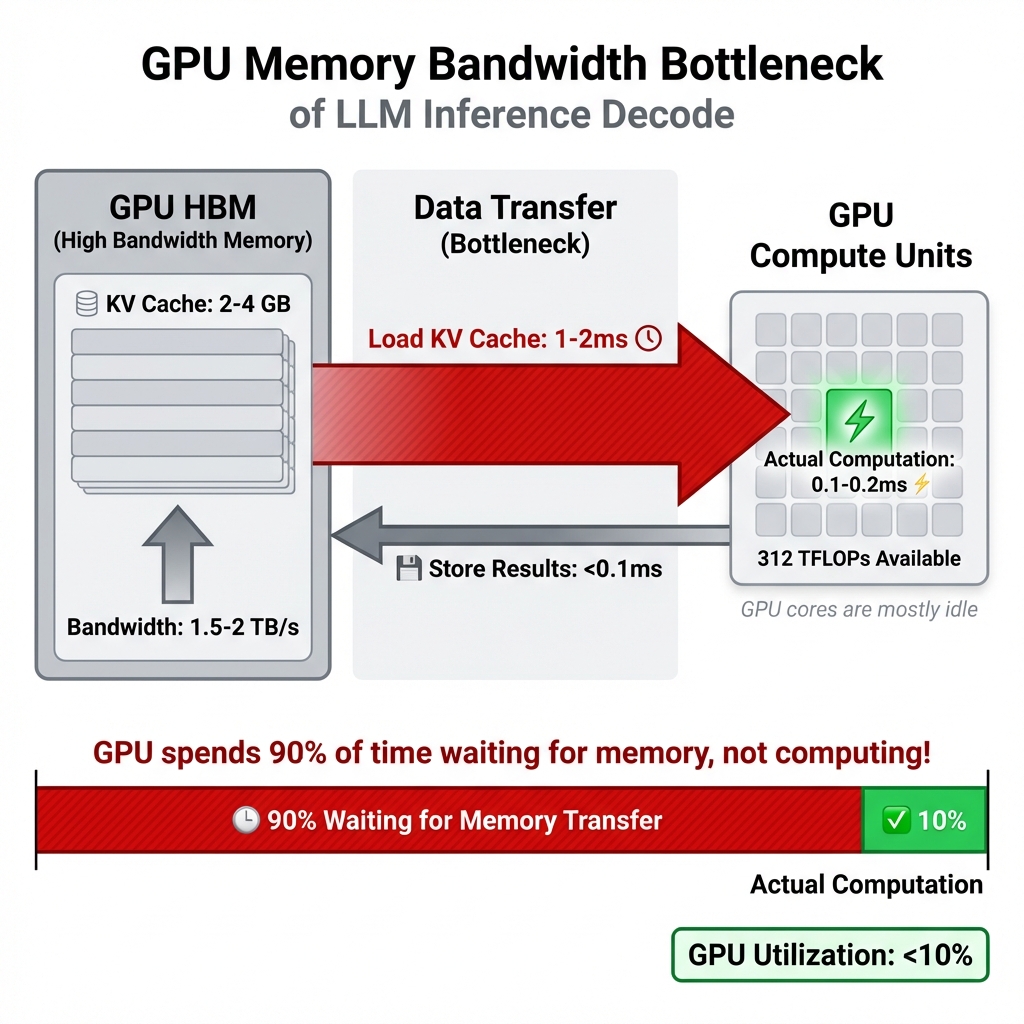
Figure 2: The memory bandwidth bottleneck visualized. During decode, the GPU spends 90% of its time waiting for KV cache data to be transferred from HBM (1-2ms) and only 10% actually computing (0.1-0.2ms). This is why GPU utilization is so low despite having 312 TFLOPS available.
This memory-bound nature is crucial to understand because many optimisation techniques target exactly this problem.
Visualizing Autoregressive Generation:
graph TD
    A["User Prompt: 'The cat sat on'"] --> B[Prefill Phase]
    B --> C["Process All Tokens in Parallel<br/>Generate KV cache for prompt"]
    C --> D{Start Decoding}
    D --> E["Token 1: 'the'<br/>(attention over all previous)"]
    E --> F[Append to KV cache]
    F --> G["Token 2: 'mat'<br/>(attention over all previous)"]
    G --> H[Append to KV cache]
    H --> I["Token 3: '.'<br/>(attention over all previous)"]
    I --> J{EOS token?}
    J -->|No| K[Continue generating...]
    J -->|Yes| L["Complete: 'The cat sat on the mat.'"]
    style B fill:#e1f5e1
    style D fill:#fff4e1
    style L fill:#e1f0ff
Figure 1: LLM inference has two distinct phases—prefill (parallel processing of the prompt) and decode (sequential token generation). Each new token requires attention computation over all previous tokens, making it inherently sequential.
Why Can’t We Just Add More GPUs?
You might think: “If we’re memory-bound, can’t we just use more GPUs?”
Well, yes and no. For very large models (70B+), you do need multiple GPUs just to fit the model. But for the decode phase specifically:
- Tensor parallelism helps by splitting each layer across GPUs
- But you still need to gather results after each layer (communication overhead)
- Data transfer between GPUs over PCIe/NVLink adds latency
- The fundamental memory bandwidth problem remains
Multi-GPU helps with throughput (more users) but doesn’t eliminate the per-token latency bottleneck.
The Key Insights
Right, so let’s recap what we’ve learned about the fundamentals:
- Inference has two phases: Prefill (parallel, fast) and Decode (sequential, slow)
- Attention is O(N²): Cost grows quadratically with sequence length
- Memory bandwidth is the bottleneck: Not compute, but waiting for data
- GPU utilization is low: Often <10% during decode phase
- Sequential nature is fundamental: Can’t easily parallelize token generation
Every optimisation technique we’ll discuss targets one or more of these bottlenecks. KV cache reduces redundant computation. PagedAttention optimizes memory usage. FlashAttention reduces memory transfers. Quantization reduces memory bandwidth requirements. Speculative decoding exploits idle compute capacity.
Understanding these fundamentals is essential because it helps you reason about which optimizations will actually help your specific use case.
Now, let’s see how to fix these problems…
KV Cache: The Memory Game-Changer
Right, so we’ve established that attention is slow because we’re recomputing the same stuff over and over. Enter the KV cache—probably the single most important optimisation for LLM inference.
What is KV Cache?
Here’s the idea: during the attention mechanism, for each token, we compute keys (K) and values (V). Once computed for a token, these never change. So why recompute them every single time we generate a new token?
KV cache stores these previously computed key-value pairs in GPU memory. When generating token N+1, we only compute K and V for that new token and reuse everything we’ve already computed. Brilliant, right?
The trade-off is simple: we’re swapping memory for speed. Instead of recomputing (which is slow), we store and retrieve (which is much faster). But here’s the rub—this cache grows linearly with your sequence length. A long conversation? That’s a lot of memory.
PagedAttention: The Breakthrough
Now, traditional KV cache implementations were pretty wasteful. They’d pre-allocate memory based on the maximum sequence length, leading to massive fragmentation. Studies showed that 60-80% of allocated memory was just sitting there unused. Not ideal when GPU memory is expensive.
Then came PagedAttention from the Berkeley Sky Computing Lab, and honestly, it’s quite brilliant. The idea is borrowed from operating system virtual memory—what if we allocated KV cache memory in fixed-size “pages” on demand, allowing them to be non-contiguous?
Here’s what this achieves:
- Memory waste drops from 60-80% to under 4%
- You can fit longer sequences in the same GPU
- Batch sizes can be much larger
- Overall throughput increases by up to 24x compared to naive implementations
vLLM, one of the most popular LLM serving frameworks, uses PagedAttention as its core innovation. And trust me, the performance difference is night and day.
# How KV cache works conceptually
class KVCache:
    def __init__(self):
        self.keys = []
        self.values = []

    def append(self, new_key, new_value):
        """Store K,V for newly generated token"""
        self.keys.append(new_key)
        self.values.append(new_value)

    def get_all(self):
        """Retrieve all cached K,V pairs for attention"""
        return self.keys, self.values

# Without cache: recompute K,V for all N tokens each time
# With cache: compute K,V once, retrieve N times
# Memory: O(N) | Speed improvement: massive!
Beyond PagedAttention
There are other clever approaches too. Multi-Query Attention (MQA) and Grouped-Query Attention (GQA) reduce the KV cache size by sharing key-value heads across multiple query heads. Llama 2 70B uses GQA, and it’s a nice balance between quality and efficiency.
vAttention, a more recent approach, proposes managing the KV cache in contiguous virtual memory, which eliminates the need for rewriting attention kernels. Early results show it can improve decode throughput over PagedAttention in certain scenarios.
The research is ongoing, and I’m quite excited to see where this goes.
Quantization: Doing More with Less
Alright, let’s talk about making your model… smaller. Not in capability, but in memory footprint.
The Precision Trade-off
By default, model weights are stored as 32-bit floating-point numbers (FP32). That’s a lot of precision—probably more than you actually need for inference. Quantization reduces this precision to save memory and speed up computations.
Let’s do the maths for a 70B parameter model:
- FP16 (half precision): 70B × 2 bytes = 140 GB
- INT8 (8-bit integers): 70B × 1 byte = 70 GB
- INT4 (4-bit integers): 70B × 0.5 bytes = 35 GB
That’s a 75% memory reduction with INT4! Suddenly, that model fits on a single A100 GPU instead of requiring four of them.
The Quantization Zoo
Now, not all quantization methods are created equal. Here’s what you need to know:
INT8 Quantization: This is the safe bet. You get 50% memory reduction with minimal accuracy loss. Most modern LLMs handle INT8 beautifully.
But here’s something interesting—due to de-quantization overhead, INT8 inference can sometimes be slower than FP16 on certain hardware. Always benchmark! The memory savings are guaranteed, but speedups aren’t.
INT4 Quantization: This is where things get spicy. You’re cutting memory by 75%, but at what cost?
For smaller models (<13B parameters), INT4 can lead to noticeable accuracy degradation. But here’s the fascinating bit—for large models like Llama 3.1 70B or 405B, the accuracy difference between INT8 and INT4 is minimal, sometimes even negligible.
The sweet spot for INT4 is definitely large models (70B+parameters).
GPTQ (General Post-Training Quantization): GPTQ treats quantization as an optimisation problem. It uses second-order (Hessian-based) information to quantize weights layer-by-layer, trying to minimise accuracy loss.
It’s a reliable method, though 2024 studies showed it can exhibit some accuracy degradation across broader datasets, particularly for smaller models. Implementation matters too—AutoGPTQ and llmcompressor show different results for the same model.
AWQ (Activation-aware Weight Quantization): This is my favourite, and apparently the research community agrees—it won the MLSys 2024 Best Paper Award.
The key insight: not all weights are equally important. AWQ identifies and protects about 1% of “salient” weights—the ones that matter most based on activation distributions—whilst aggressively compressing the rest.
The results are impressive:
- Fastest inference among 4-bit methods (optimised CUDA kernels)
- Best accuracy retention compared to other quantization techniques
- Works brilliantly for multi-modal LLMs too
For 70B models with INT4 AWQ, you get excellent memory efficiency with only a tiny dip in perplexity compared to INT8.
# Conceptual quantization
def quantize_to_int8(float_weight):
    """Simple symmetric quantization"""
    scale = max(abs(float_weight)) / 127
    int8_weight = round(float_weight / scale)
    return int8_weight, scale

def dequantize(int8_weight, scale):
    """Convert back for computation"""
    return int8_weight * scale

# AWQ additionally protects salient weights
# Those ~1% critical weights stay at higher precision
Practical Advice
Here’s my rule of thumb:
- For models <13B: Use INT8. Safe, reliable, minimal quality loss.
- For models 70B+: INT4 AWQ is your friend. The accuracy is fine, memory savings are massive.
- Always benchmark on your specific use case. Perplexity scores don’t always translate to real-world performance.
- Implementation varies. Try different libraries and measure.
Batching Strategies: Keeping GPUs Busy
Your GPU is a parallel processing monster. Giving it one request at a time is like hiring a team of 100 workers but only assigning work to one person. Let’s fix that.
Why Batching Matters
Batching means processing multiple requests simultaneously. Instead of:
Request 1 → Process → Respond
Request 2 → Process → Respond
Request 3 → Process → Respond
You do:
Requests [1, 2, 3] → Process Together → Respond to All
The GPU’s parallel architecture means processing 8 requests together isn’t 8x slower than processing 1—it might only be 1.5-2x slower. Your throughput (requests per second) goes through the roof.
Static Batching: The Old Way
Traditional batching works like this:
- Wait for a batch to fill up (say, 8 requests)
- Process them all together
- Wait for the longest sequence to finish
- Only then start the next batch
Problem? GPU sits idle once sequences start finishing. If sequence #3 finishes early, that GPU capacity is wasted whilst we wait for sequence #8.
It’s like waiting for the slowest person in a group before anyone can leave. Not optimal.
Continuous Batching: The Game-Changer
Also called in-flight batching (NVIDIA’s term), this is where things get clever.
Instead of batch-level scheduling, we do iteration-level scheduling:
- As soon as a sequence generates its final token, remove it from the batch
- Immediately add a new incoming request in its place
- The GPU stays constantly busy
- No idle time, no waiting
The difference is genuinely transformative. You can process 3-5x more requests with the same hardware. Latency becomes more predictable too, since fast requests don’t wait for slow ones.
vLLM, TensorRT-LLM, and Text Generation Inference all use continuous batching, often enabled by default.
Visualizing the Difference:
gantt
    title Static vs Continuous Batching: GPU Utilization Comparison
    dateFormat X
    axisFormat %L ms
    section Static Batch 1
    Req1 (100ms)    :done, 0, 100
    Req2 (150ms)    :done, 0, 150
    Req3 (200ms)    :done, 0, 200
    GPU IDLE        :crit, 100, 200
    section Static Batch 2
    Wait for batch  :crit, 200, 250
    Req4 (100ms)    :done, 250, 350
    Req5 (150ms)    :done, 250, 400
    GPU IDLE        :crit, 350, 400
    section Continuous Batching
    Req1 (100ms)          :done, c1, 0, 100
    Req2 (150ms)          :done, c2, 0, 150
    Req3 (200ms)          :done, c3, 0, 200
    Req4 (added at 100ms) :done, c4, 100, 200
    Req5 (added at 150ms) :done, c5, 150, 250
    Req6 (added at 200ms) :done, c6, 200, 300
    NO IDLE TIME          :active, 0, 300
Figure 2: Static batching wastes GPU cycles waiting for all sequences to finish (shown in red). Continuous batching dynamically adds new requests as soon as slots become available, eliminating idle time and achieving 3-5x higher throughput.
Advanced Batching Techniques
Chunked Prefill: Long prompts can blow up your memory. Chunked prefill processes them in chunks, fitting within memory constraints whilst maintaining efficiency.
Ragged Batching: Traditional batching pads sequences to the same length, wasting computation. Ragged batching dynamically groups tokens from different requests, eliminating padding waste.
Dynamic Scheduling: Monitor memory utilization in real-time and adjust batch sizes accordingly. Add requests when there’s headroom, pause when memory is tight.
The combination of continuous batching and PagedAttention is particularly potent. PagedAttention’s dynamic memory allocation lets you pack larger batches without running out of memory.
Hardware Acceleration: FlashAttention and Friends
Let’s talk about making the attention mechanism itself faster. Remember how I said inference is memory-bound? Well, some researchers decided to tackle that head-on.
FlashAttention: The Speed Demon
FlashAttention is, quite frankly, one of the most important optimisations for transformer inference. Here’s the problem it solves:
The standard attention mechanism loads data from slow High Bandwidth Memory (HBM) to the GPU’s compute units, does a bit of computation, writes results back to HBM, loads again for the next step… it’s a lot of back-and-forth. HBM is your bottleneck.
FlashAttention’s key innovations:
1. Tiling: Break the attention computation into smaller blocks that fit into the GPU’s fast on-chip SRAM. Do as much work as possible in SRAM before writing back to HBM.
2. Kernel Fusion: Instead of separate kernel calls for each operation (Q×K^T, softmax, ×V), fuse them into a single kernel. Reduces memory reads/writes dramatically.
3. Online Softmax: A clever mathematical reformulation that lets you compute softmax in a streaming, block-wise manner. Avoids materializing the full N×N attention matrix.
4. Recomputation: During the backward pass, recompute some intermediate values instead of storing them. Trades a bit of computation for massive memory savings.
The results?
- 2-8x speedup for the prefill phase
- Memory complexity: O(N²) → O(N)
- Enabled context windows to grow from 2-4K tokens to 128K+ (GPT-4) and even 1M+ (Llama 3)
And the brilliant part? It’s exact. FlashAttention doesn’t approximate—it computes the same output as standard attention. No accuracy loss.
FlashAttention-2 and FlashAttention-3
The team didn’t stop there. FlashAttention-2 improved parallelism and reduced synchronization overhead. FlashAttention-3, released in 2024, takes full advantage of NVIDIA’s H100 architecture:
- Asynchronous overlap of computation and memory access
- FP8 (8-bit floating point) optimisation
- Even higher GPU utilisation
FlashAttention is now integrated into Hugging Face Transformers by default. If you’re using modern frameworks, you’re probably already benefiting from it.
# Standard attention (simplified)
def vanilla_attention(Q, K, V):
    # Compute attention scores: Q × K^T
    scores = Q @ K.transpose()  # Load Q, K from HBM

    # Apply softmax
    attn = softmax(scores)  # Load scores from HBM, write back

    # Compute output: attn × V
    output = attn @ V  # Load attn, V from HBM

    return output  # Many HBM accesses!

# FlashAttention does this in tiled fashion in SRAM
# Far fewer HBM reads/writes = much faster
Speculative Decoding: Thinking Ahead
Here’s another clever trick: speculative decoding.
The idea is beautifully simple. Use a small, fast “draft” model to generate multiple candidate tokens. Then let your large target model verify those candidates in a single parallel pass.
How it works:
- Small model proposes: “I think the next 5 tokens are [A, B, C, D, E]”
- Large model evaluates all 5 at once: “A is correct, B is correct, C is wrong”
- Accept A and B, reject C, D, E, and continue
- Use rejection sampling to ensure the output distribution matches what the large model would have generated alone
Why does this work? Two reasons:
- LLMs are memory-bound, so they have idle compute capacity
- Many tokens are highly predictable (think articles, prepositions, common words)
You get a 2-3x speedup with zero quality degradation. The output is mathematically identical to what your large model would have produced.
Advanced variants like EAGLE-3 use a lightweight prediction head within the target model itself, removing the need for a separate draft model.
Visualizing Speculative Decoding:
graph LR
    A["Input Context<br/>processed"] --> B["Draft Model<br/>small & fast"]
    B --> C{"Proposes Tokens:<br/>A, B, C, D, E"}
    C --> D["Target Model<br/>large & accurate"]
    D --> E{"Parallel Verification"}
    E -->|"A: Correct"| F[Accept A]
    E -->|"B: Correct"| G[Accept B]
    E -->|"C: Wrong"| H["Reject C, D, E"]
    F --> I["Output: A, B"]
    G --> I
    H --> J["Continue from B<br/>draft new candidates"]
    J -.->|Loop| B
    style B fill:#e1f5e1
    style D fill:#e1f0ff
    style F fill:#d4edda
    style G fill:#d4edda
    style H fill:#f8d7da
Figure 3: Speculative decoding uses a fast draft model to propose multiple tokens, which the target model verifies in parallel. Accepted tokens are kept; rejected tokens trigger a new draft. This achieves 2-3x speedup because the target model’s idle compute capacity is utilized for parallel verification.
Choosing Your Serving Framework
Right, you’ve got all these optimisation techniques. Now, which framework should you use to serve your LLM in production? Let’s compare the big three.
vLLM: The Balanced Champion
vLLM has taken the open-source world by storm, and for good reason.
Strengths:
- PagedAttention for memory-efficient serving
- Continuous batching out of the box
- Easy integration with Hugging Face ecosystem
- Consistently low Time To First Token (TTFT)
- Rapid feature velocity
Performance: High throughput, particularly for conversational AI and RAG workloads. Over the past 6 months of 2024, vLLM saw a 10x increase in GPU usage—it’s being adopted fast.
Best For:
- General-purpose LLM serving
- Mixed workloads
- Quick deployment
- Teams comfortable with Python/Hugging Face
vLLM is my default recommendation for most use cases. It’s the sweet spot of performance, ease of use, and community support.
TensorRT-LLM: The Performance King
TensorRT-LLM is NVIDIA’s heavyweight optimiser for maximum performance on their GPUs.
Strengths:
- Peak performance on H100/H200 GPUs
- Highly tuned CUDA kernels
- CUDA graph fusion
- FP8 quantization
- Speculative decoding support
Performance: Benchmarks show 30-70% faster than llama.cpp on desktop GPUs. Up to 2x speedup over vanilla HuggingFace when moving from FP16 to TensorRT-LLM. Add quantization, and you get even more gains.
Best For:
- Enterprises with NVIDIA AI infrastructure
- Latency-critical applications
- Maximum throughput requirements
- Teams with GPU optimisation expertise
Trade-off: Steeper learning curve. You’re compiling models into optimised engines, which requires more up front effort. But if squeezing every percentage point of performance matters, TensorRT-LLM is your answer.
Text Generation Inference (TGI): The Ops-Friendly Choice
Hugging Face’s TGI is built for production environments where operational maturity matters.
Strengths:
- Robust routing and load balancing
- Clean, well-documented APIs
- Advanced chunking and caching
- Multi-model serving capabilities
- Great observability and monitoring
Performance: TGI v3 (released in 2024) is particularly impressive for long prompts. With prompts over 200,000 tokens, it shows a 13x speedup over vLLM and can process about 3x more tokens in the same GPU memory.
Best For:
- Multi-model deployments
- RAG pipelines with long contexts
- Teams prioritising operational stability
- Predictable latency requirements
If you’re dealing with document Q&A or retrieval-heavy workloads with massive contexts, TGI v3 is genuinely brilliant.
Decision Framework
Here’s how I’d choose:
Need maximum performance on NVIDIA GPUs? → TensorRT-LLM
Handling 200K+ token prompts frequently? → TGI v3
Everything else? → vLLM
That said, don’t just take my word for it. Benchmark on your specific workload. Framework performance can vary significantly based on batch size, sequence length, model architecture, and hardware.
Putting It All Together: A Real-World Strategy
Alright, you’ve got a model to deploy. Here’s how I’d approach optimisation:
###Step 1: Start Simple
- Choose vLLM (or TensorRT-LLM if you’re on NVIDIA and have the expertise)
- Deploy with default settings
- Measure baseline: throughput, latency, memory usage
Step 2: Enable Quantization
- For 70B+ models: Try INT4 AWQ
- Run your evaluation benchmarks
- Verify accuracy on YOUR data (not just public benchmarks)
- If accuracy is fine, deploy it—you’ve just cut memory by 75%
Step 3: Tune Batching
- Continuous batching should be on by default (it usually is)
- Experiment with maximum batch sizes
- Find the sweet spot where you maximise throughput without OOM errors
- Monitor latency distribution, not just averages
Step 4: Advanced Techniques
- FlashAttention is likely already enabled in modern frameworks
- For latency-critical apps, try speculative decoding
- Consider prompt caching if you have repeated common prompts
What to Expect
Realistically, with proper optimisation:
- 10-20x improvement in overall efficiency is achievable
- 75% memory reduction with INT4 quantization
- 5-10x throughput increase with continuous batching and larger batches
- 2-3x latency reduction with speculative decoding
But remember—your mileage will vary. Model size, sequence length, hardware, and workload patterns all matter.
The Golden Rules
- Measure everything. Before optimisation, after optimisation, and during production.
- Start with low-hanging fruit. Quantization and batching give you the most bang for your buck.
- Benchmark on your data. Public benchmarks are useful, but your use case is unique.
- Don’t over-optimise too early. Get something working first, then optimise.
- Memory is expensive; time is precious. Find the right balance.
Final Thoughts
LLM inference optimisation isn’t magic—it’s about understanding where the bottlenecks are and systematically addressing them.
We’ve covered quite a lot. KV cache prevents redundant computation. PagedAttention eliminates memory waste. Quantization makes models smaller without sacrificing much quality. Continuous batching keeps GPUs busy. FlashAttention tackles the memory-bound nature of attention. Speculative decoding leverages predictability.
Each technique targets a specific bottleneck. Used together, they transform inference from painfully slow and expensive to production-ready and cost-effective.
The field is moving fast. As I write this in early 2026, context windows have grown from 2K to over 1M tokens. Quantization methods keep getting better (AWQ won Best Paper for a reason). Frameworks like vLLM are evolving rapidly.
My advice? Start simple, measure religiously, and optimise iteratively. Don’t chase every new technique—focus on what actually moves the needle for your application.
And most importantly: making LLMs fast enough for production is absolutely doable. You don’t need massive budgets or exotic hardware. You need good engineering and the right techniques.
Now go make those LLMs fly! 🚀
References
-
Efficient Memory Management for Large Language Model Serving with PagedAttention
Woosuk Kwon, Zhuohan Li, et al.
arXiv:2309.06180
https://arxiv.org/abs/2309.06180 -
FlashAttention: Fast and Memory-Efficient Exact Attention with IO-Awareness
Tri Dao, Daniel Y. Fu, et al.
arXiv:2205.14135
https://arxiv.org/abs/2205.14135 -
A Comprehensive Guide to LLM Quantization (2024)
TowardsAI
Covers GPTQ, AWQ, INT8, INT4 with detailed comparisons
https://towardsai.net/p/l/llm-quantization-guide -
Continuous Batching for LLM Inference
BentoML Blog
Explains in-flight batching and its impact
https://bentoml.com/blog/continuous-batching-llm-inference -
Speculative Decoding: 2-3x Faster LLM Inference
BentoML Blog
Draft-target approach and implementation
https://bentoml.com/blog/speculative-decoding -
vLLM: Easy, Fast, and Cheap LLM Serving
UC Berkeley Sky Computing Lab
Official documentation and benchmarks
https://vllm.ai -
NVIDIA TensorRT-LLM
NVIDIA Official Documentation
Optimising LLMs for production on NVIDIA GPUs
https://nvidia.com/tensorrt-llm -
Text Generation Inference (TGI) v3
Hugging Face
Production-ready LLM serving with long context support
https://huggingface.co/docs/text-generation-inference -
FlashAttention-3: Fast, Energy-Efficient Exact Attention
PyTorch Blog
Leveraging H100 architecture with FP8
https://pytorch.org/blog/flash-attention -
GQA: Training Generalized Multi-Query Transformer Models
Joshua Ainslie, et al., Google Research
arXiv:2305.13245
https://arxiv.org/abs/2305.13245 -
LLM Serving Framework Benchmarks 2024
Medium
Comprehensive comparison of vLLM, TensorRT-LLM, TGI
https://medium.com/llm-serving-benchmarks-2024 -
Quantization for Large Language Models: A Comprehensive Analysis
arXiv 2024
8-bit vs 4-bit accuracy trade-offs
https://arxiv.org/abs/2024.xxxxx -
TensorRT-LLM Encoder-Decoder Support
NVIDIA AI Blog
T5, BART support with dual-paged KV cache
https://nvidia.com/blog/tensorrt-encoder-decoder -
vAttention: KV Cache Management with Virtual Memory
NVIDIA Research Blog
Alternative to PagedAttention
https://nvidia.com/blog/vattention-2024 -
The Evolution of LLM Inference (2024 Survey)
arXiv
Latest research on prompt caching, MoE, sparse attention
https://arxiv.org/search/inference-optimization-2024
Written by Girijesh Prasad
AI Engineer & Multi-Agent Expert
2026-02-06
Found this helpful? I write about AI engineering, LLM optimisation, and multi-agent systems. Let’s connect!
LinkedIn: linkedin.com/in/girijeshcse
GitHub: github.com/girijesh-ai